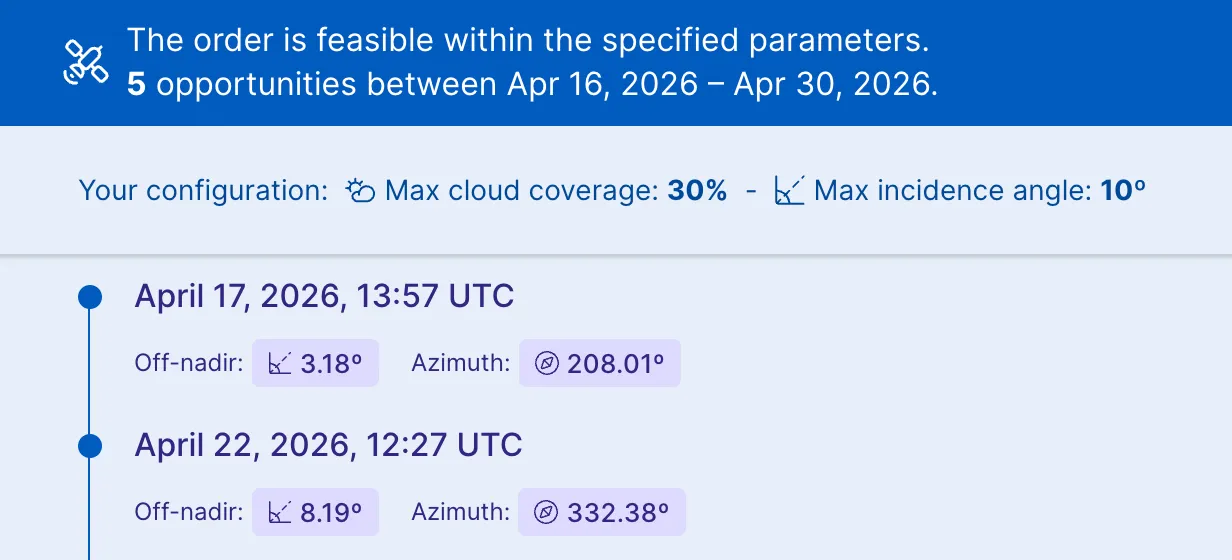
Tasking opportunities are predicted time intervals when sensors of a selected collection pass over your AOI during a specified acquisition time period to capture imagery with the given order parameters.
To see opportunities for tasking collections:
- Open the console, go to
 Tasking, and click Create new +.
 - Select the collection whose opportunities you want to see and click Continue with this selection.
- Add geometries and select Configure this collection. Click Continue.
- Set the order name, the acquisition dates, and the rest of order parameters.
The colored circles indicate how well each potential opportunity matches the maximum cloud coverage and incidence angle parameters you set in your order:
-
 : Exceeds set limits by more than 5% cloud coverage or 5° incidence angle.
 -
 : Slightly exceeds set limits, within 5% or 5° of the maximum.
 -
 : Fully within set limits, or no limits were set.
API names of supported collections
| Collection title | API name |
|---|---|
| BlackSky Gen-2 Tasking | blacksky-tasking |
| BlackSky Gen-3 Tasking | blacksky-gen3-tasking |
| Pléiades Neo Tasking | pneo-tasking |
| Pléiades Tasking | PHR-tasking |
| SPOT Tasking | SPOT-tasking |
| Collection | Description |
|---|---|
| BlackSky | Required parametersOrder parameters that must be set to discover opportunities:
OutputFrom today, opportunities for the next 14 days are provided with the following:
|
| Pléiades | Required parametersOrder parameters that must be set to discover opportunities:
Optional parametersOptional parameters to narrow results: OutputFrom the given start date, opportunities for the next 7 days are provided with the following:
|
| Pléiades Neo | Required parametersOrder parameters that must be set to discover opportunities:
Optional parametersOptional parameters to narrow results: OutputFrom the given start date, opportunities for the next 7 days are provided with the following:
|
| SPOT | Required parametersOrder parameters that must be set to discover opportunities:
Optional parametersOptional parameters to narrow results: OutputFrom the given start date, opportunities for the next 7 days are provided with the following:
|
API names of supported collections
| Collection title | API name |
|---|---|
| Capella Space Tasking | capella-tasking |
| Umbra Tasking | umbra-tasking |
| Collection | Description |
|---|---|
| Capella Space | Required parametersOrder parameters that must be set to discover opportunities:
OutputFrom the given start date, opportunities for the next 28 days are provided with the following:
|
| Umbra | Required parametersOrder parameters that must be set to discover opportunities:
Optional parametersOptional parameters to narrow results: OutputFrom today, opportunities for the next 7 days are provided with the following:
|