Different file formats are supported depending on the platform option.
| Platform option | File format |
|---|---|
| Console | GeoJSON KML WKT |
| API | GeoJSON |
| SDK | GeoJSON KML Shapefile WKT |
GeoJSON files store coordinates in the JSON format. Both extensions are accepted: .geojson and .json. To validate and view your GeoJSON file, use the GeoJSON validator tool.
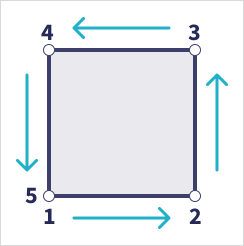
The coordinates of a valid GeoJSON Polygon should follow the right-hand rule:
- The coordinates are placed in a counterclockwise order.
- The first and last coordinates are identical.
If you need to apply the right-hand rule to your GeoJSON file, use the right-hand-rule rewinder tool.
If you want to preview or edit your GeoJSON file before creating an order, use the geojson.io tool.
An example of a single AOI GeoJSON
{ "type": "FeatureCollection", "features": [ { "type": "Feature", "properties": {}, "geometry": { "type": "Polygon", "coordinates": [ [ [-77.05788457660967, 38.87253259892824], [-77.05844056290393, 38.86996206506943], [-77.05552622493516, 38.868757801256], [-77.0531553685479, 38.87053267794386], [-77.05465973756702, 38.87291016281703], [-77.05788457660967, 38.87253259892824] ] ] } } ]}An example of a multipart AOI GeoJSON
{ "type": "FeatureCollection", "features": [ { "type": "Feature", "properties": {}, "geometry": { "type": "Polygon", "coordinates": [ [ [-0.23813040507974392, 51.468798304729745], [-0.04103438196207776, 51.468798304729745], [-0.04103438196207776, 51.54859446205262], [-0.23813040507974392, 51.54859446205262], [-0.23813040507974392, 51.468798304729745] ] ] }, "id": 0 }, { "type": "Feature", "properties": {}, "geometry": { "type": "Polygon", "coordinates": [ [ [-2.007448902677595, 52.535413959131574], [-2.007448902677595, 52.4032156024264], [-1.7842843091614498, 52.4032156024264], [-1.7842843091614498, 52.535413959131574], [-2.007448902677595, 52.535413959131574] ] ] }, "id": 1 } ]}An example of a single POI GeoJSON
{ "type": "FeatureCollection", "features": [ { "type": "Feature", "properties": {}, "geometry": { "type": "Point", "coordinates": [-73.98716020201383, 40.73106717134863] } } ]}An example of a multipart POI GeoJSON
{ "type": "FeatureCollection", "features": [ { "type": "Feature", "properties": {}, "geometry": { "type": "Point", "coordinates": [-73.98716020201383, 40.73106717134863] } }, { "type": "Feature", "properties": {}, "geometry": { "type": "Point", "coordinates": [-71.05828675347368, 42.360262258503866] } } ]}Keyhole Markup Language (KML) is an XML-based format initially developed for Google Earth.
An example of a single AOI KML
<kml xmlns="http://www.opengis.net/kml/2.2"> <Placemark> <Polygon> <outerBoundaryIs> <LinearRing> <coordinates> -77.05788457660967,38.87253259892824 -77.05465973756702,38.87291016281703 -77.0531553685479,38.87053267794386 -77.05552622493516,38.868757801256 -77.05844056290393,38.86996206506943 -77.05788457660967,38.87253259892824 </coordinates> </LinearRing> </outerBoundaryIs> </Polygon> </Placemark></kml>An example of a multipart AOI KML
<kml xmlns="http://www.opengis.net/kml/2.2"> <Placemark> <Polygon> <outerBoundaryIs> <LinearRing> <coordinates> -0.23813040507974392,51.468798304729745 -0.04103438196207776,51.468798304729745 -0.04103438196207776,51.54859446205262 -0.23813040507974392,51.54859446205262 -0.23813040507974392,51.468798304729745 </coordinates> </LinearRing> </outerBoundaryIs> </Polygon> </Placemark> <Placemark> <Polygon> <outerBoundaryIs> <LinearRing> <coordinates> -2.007448902677595,52.535413959131574 -2.007448902677595,52.4032156024264 -1.7842843091614498,52.4032156024264 -1.7842843091614498,52.535413959131574 -2.007448902677595,52.535413959131574 </coordinates> </LinearRing> </outerBoundaryIs> </Polygon> </Placemark></kml>An example of a single POI KML
<kml xmlns="http://www.opengis.net/kml/2.2"> <Placemark> <Point> <coordinates>-73.98716020201383,40.73106717134863</coordinates> </Point> </Placemark></kml>An example of a multipart POI KML
<kml xmlns="http://www.opengis.net/kml/2.2"> <Placemark> <Point> <coordinates>-73.98716020201383,40.73106717134863</coordinates> </Point> </Placemark> <Placemark> <Point> <coordinates>-71.05828675347368,42.360262258503866</coordinates> </Point> </Placemark></kml>The shapefile file format should consist of at least 3 required files:
.shp— feature geometry.shx— an index position.dbf— attribute information
Other optional files can be included in a shapefile as well, such as .cpg, .prj, .xml, .sbn, or .sbx.
Well-known text (WKT) is used to represent vector geometry objects. Allowed types of coordinates are Point and Polygon.
You can convert between the GeoJSON and WKT file formats using the GeoJSON to WKT converter tool.
An example of a single AOI WKT
POLYGON ((-77.05788457660967 38.87253259892824, -77.05465973756702 38.87291016281703, -77.0531553685479 38.87053267794386, -77.05552622493516 38.868757801256, -77.05844056290393 38.86996206506943, -77.05788457660967 38.87253259892824))An example of a multipart AOI WKT
POLYGON ((-0.23813040507974392 51.468798304729745, -0.04103438196207776 51.468798304729745, -0.04103438196207776 51.54859446205262, -0.23813040507974392 51.54859446205262, -0.23813040507974392 51.468798304729745))POLYGON ((-2.007448902677595 52.535413959131574, -2.007448902677595 52.4032156024264, -1.7842843091614498 52.4032156024264, -1.7842843091614498 52.535413959131574, -2.007448902677595 52.535413959131574))An example of a single POI WKT
POINT (-73.98716020201383 40.73106717134863)An example of a multipart POI WKT
POINT (-73.98716020201383 40.73106717134863)POINT (-71.05828675347368 42.360262258503866)I can't upload a GeoJSON file I can't upload a GeoJSON file
Check that your GeoJSON file is structured as a feature collection object.
{ "type": "FeatureCollection", "features": [ { "type": "Feature", "properties": {}, "geometry": { "type": "Polygon", "coordinates": [...] } } ]}{ "type": "FeatureCollection", "features": [ { "type": "Feature", "properties": {}, "geometry": { "type": "Point", "coordinates": [...] } } ]}Can I upload a KML file with Z-value coordinates? Can I upload a KML file with Z-value coordinates?
You can upload a KML file with Z-value coordinates. However, the platform will ignore the Z-value coordinates, as it only supports two-dimensional input geometries.