The process coregisters and detects changes for a source image against a reference image. It first reduces misalignments by applying a rigid-body transformation to the source image. Once the images are aligned, the process detects changes between the images.
Change detection can be used for vegetation management, urban planning, construction, fire risk estimation, land use management, and infrastructure monitoring.
Examples of input images:
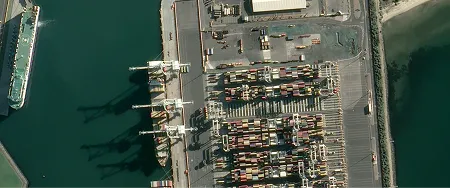

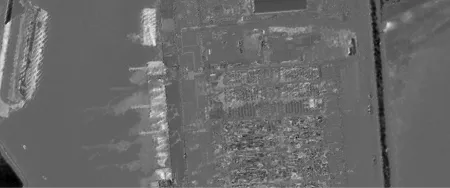
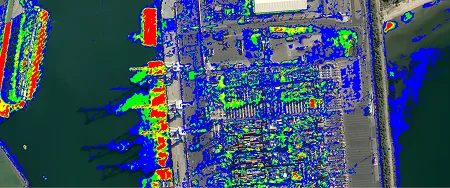
The results are the following:
- A GeoTIFF of the coregistered source image
- A GeoTIFF probability map of detected change
- A GeoTIFF heatmap for likelihood of change, with warmer colors showing a higher likelihood of change

| Specification | Description |
|---|---|
| Provider | Simularity |
| Process type | Analytics from 200 credits per km2 |
The process uses the Automated Image Anomaly Detection System (AIADS) algorithm from Simularity. It detects changes local to a given scene, such as new buildings or removed trees. It ignores changes that affect the whole scene, such as leaves changing color from green to brown.
To get the best results, make sure that:
- Both data items have matching geometric and radiometric processing levels.
- The GSD of the two data items doesn’t differ by more than 25%.
Input data items must come from a CNAM-supported collection and be added to storage in 2023 or later.
| Criteria | Requirement |
|---|---|
Product type | Input data items must come from a multispectral collection. |
| Processing level | Input data items must be georectified or orthorectified. |
| Spectral bands | |
| Geometry | The geometries of input data items must overlap by at least 20%. |
| Cloud coverage | The cloud coverage of input data items must be less than 25%. |
Use the detection-change-simularity name ID for the processing API.
A sample input payload for the process
{ "inputs": { "title": "Change detection over Berlin", "sourceItem": "https://api.up42.com/v2/assets/stac/collections/21c0b14e-3434-4675-98d1-f225507ded99/items/23e4567-e89b-12d3-a456-426614174000", "referenceItem": "https://api.up42.com/v2/assets/stac/collections/21c0b14e-3434-4675-98d1-f225507ded99/items/edeb6310-ea9a-4d8e-943d-11a5f3757824", "sensitivity": 4 }}| Parameter | Overview |
|---|---|
inputs.title | string | required The title of the output data item. |
inputs.sourceItem | string | required The absolute API path to the source data item. |
inputs.referenceItem | string | required The absolute API path to the reference data item. The positional accuracy of the source data item will be improved against this reference. |
inputs.sensitivity | number The setting that adjusts the sensitivity to change. The range of allowed values spans from |
inputs.excludeShadows | boolean Whether to remove changes caused by shadows from the results. The default value is |